August focused on getting paid faster, taking orders with less friction, and giving customers clearer documents and communications. Teams can refund and collect more confidently, build orders with live totals and better defaults, and share storefront-safe price lists — including a full Vietnamese language experience across storefront and admin.
Payments, invoices, and credits
Full invoice refunds
Staff can now fully refund paid invoices on FreshlinePay — card or ACH — or record the refund against offline books. Refunds flow through to admin totals, invoice PDFs, and the storefront, so customers and operations teams see the same settled balance.
Refund a paid invoice from the order page on FreshlinePay, with the settled balance reflected everywhere.
Charge invoices immediately
Bulk mark-as-paid now charges the selected invoices right away instead of waiting for overnight Autopay. That is useful when a buyer is on the phone, a delivery needs to go out, or you want settlement before the next batch run.
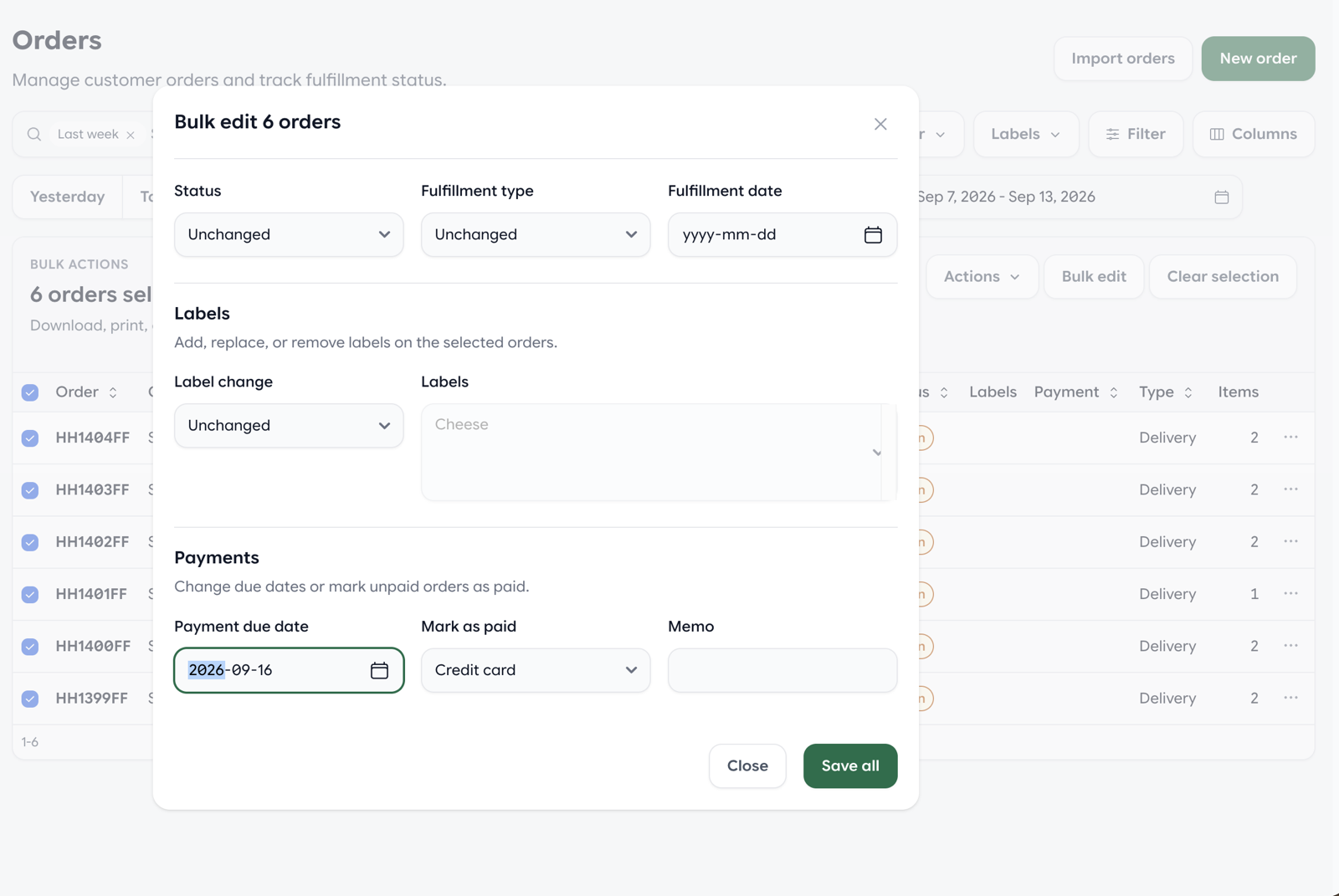
Select orders and bulk mark them as paid — or schedule collection — instead of waiting for overnight Autopay.
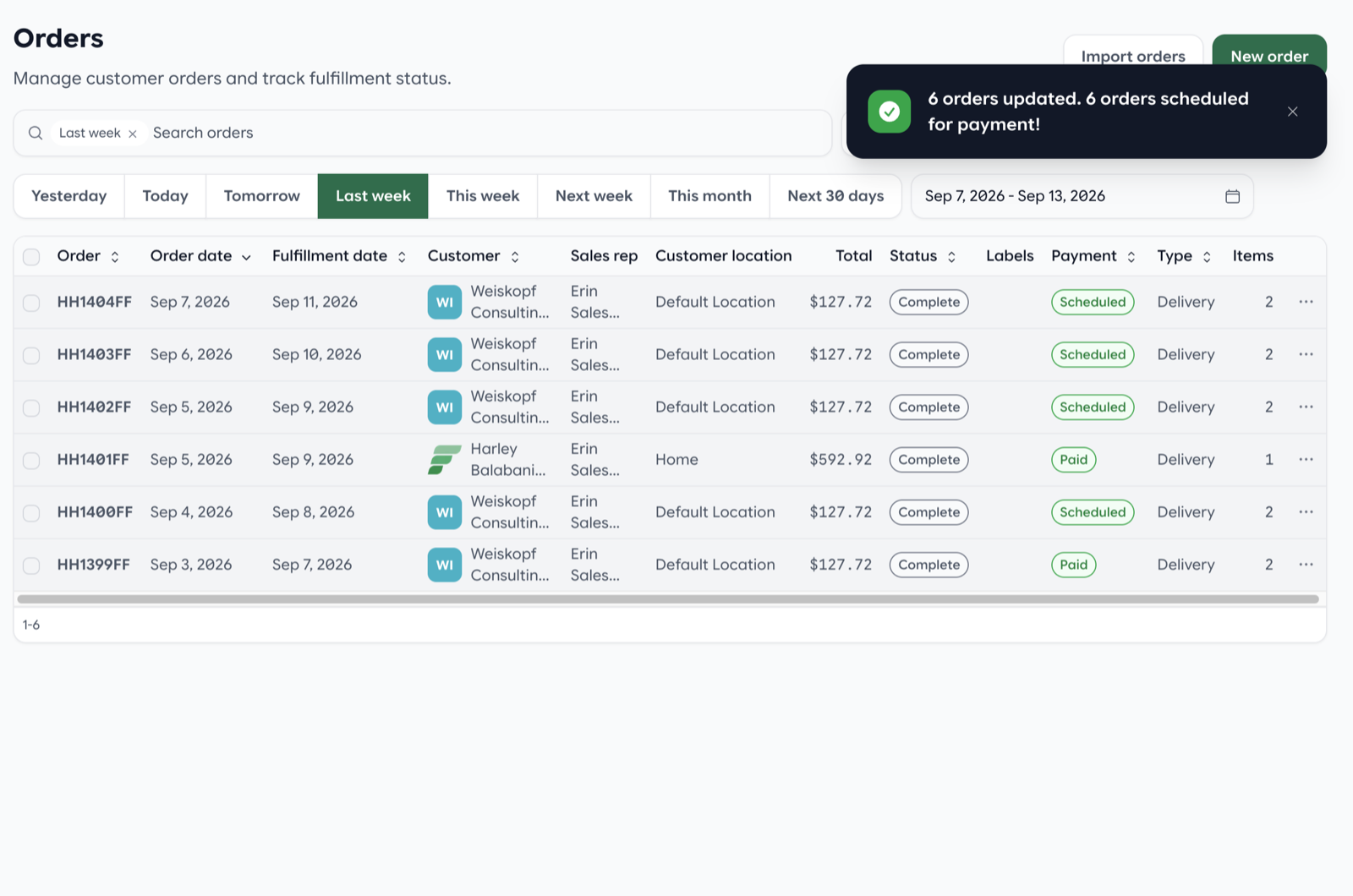
Selected invoices are scheduled or charged immediately, with payment status updated on the orders list.
Pay now from the order page
Customers can pay from the order page with a Pay now action. Email and statement pay links land there too, so buyers are not bouncing between a separate checkout and the order they already opened.
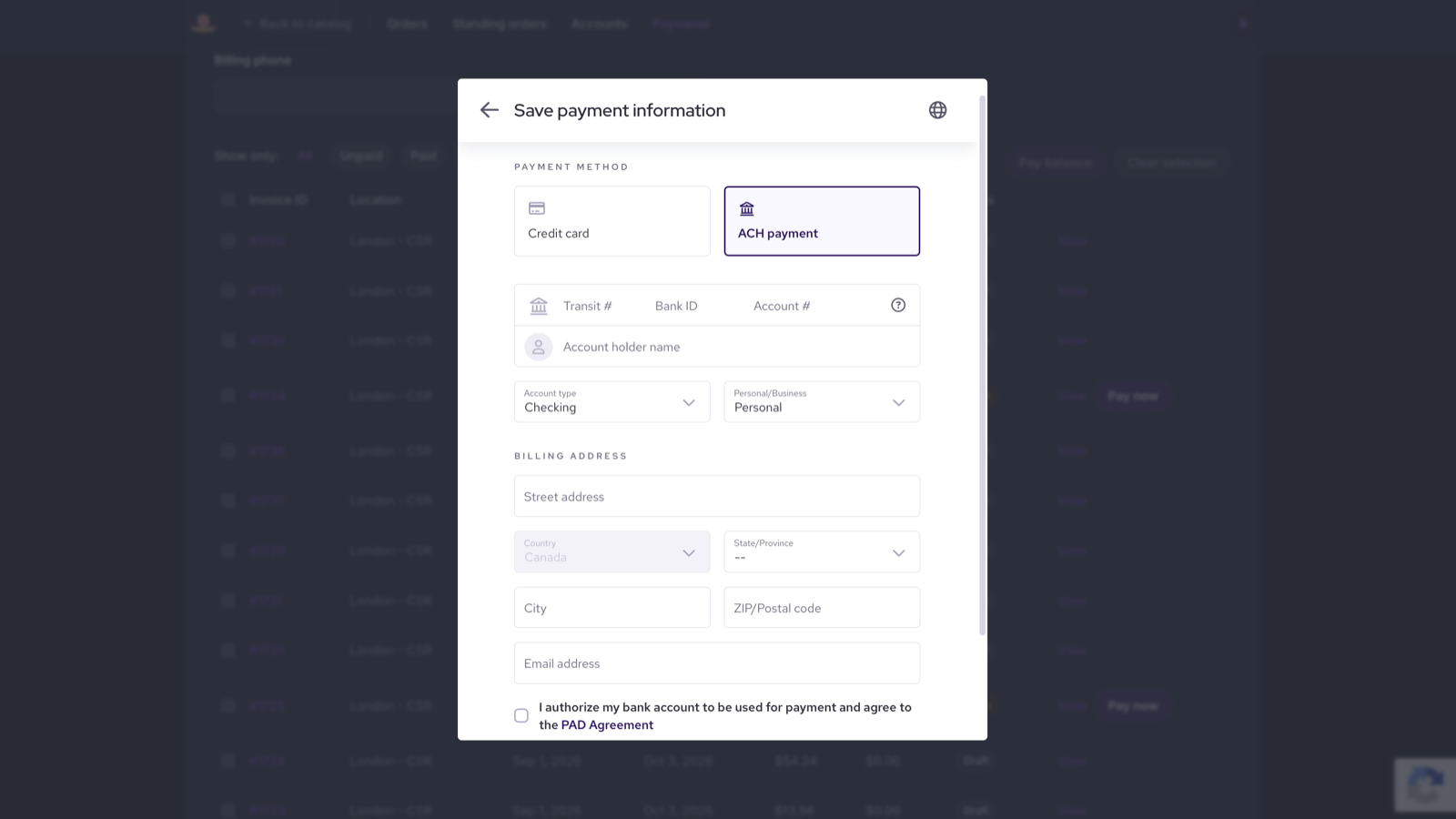
Pay now on the customer order and statement page, including saving a card or ACH on file.
Require a saved card before checkout
Stores can require a saved card before checkout, with per-buyer overrides for accounts that should skip the rule. That keeps card-on-file collection consistent without blocking exceptions you already manage by hand.
Draft invoices from the start of an order
Opening an order now creates a draft invoice. Completing the order opens that invoice with current totals, so billing stays in step with what was actually fulfilled instead of being assembled afterward.
Warehouse-scoped invoice branding
Branded invoice layouts can be scoped per warehouse, so mixed bulk PDFs keep the correct letterhead and layout for each location. Vendors can also retitle order PDFs — for example Sales Order instead of a generic heading — and long line notes no longer clip on the document.
Bulk-email invoice PDFs
From the orders list, staff can bulk-email invoice PDFs once orders are confirmed or complete. That cuts the back-and-forth of downloading, attaching, and sending invoices one account at a time.
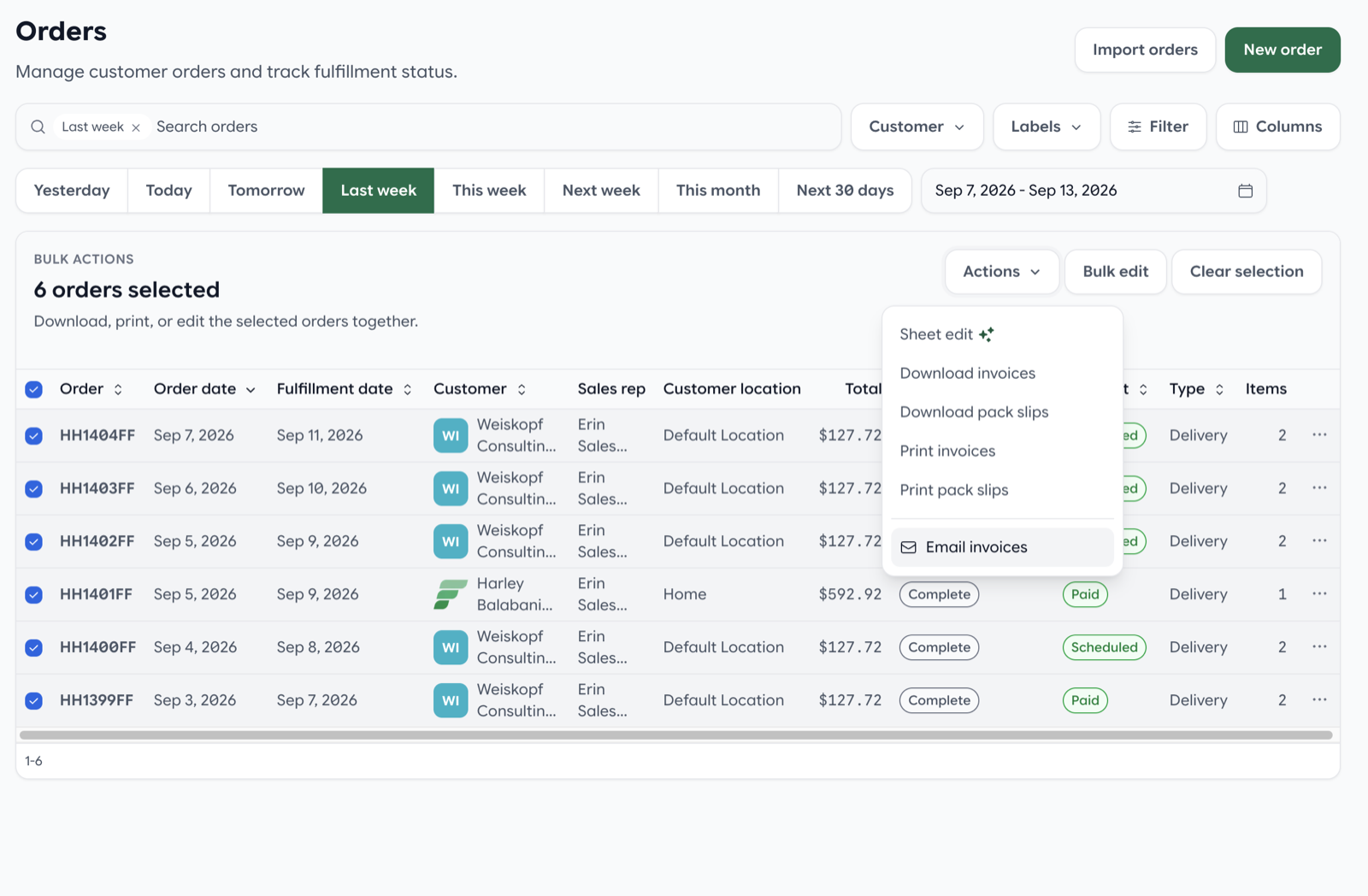
Select confirmed or complete orders, then email invoice PDFs in one bulk action.
Credits refund per-unit fees on restock
Restocking a credit now also refunds per-unit fees such as deposits and recycling charges. If the product is not restocked, those fees stay on the books — matching how most distributors handle crates, totes, and environmental fees.
Admin order taking
Order entry got a focused pass so sales and customer service can build and review orders without scrolling, guessing totals, or losing the buyer's last delivery location.
Richer sheets and live totals
Variant custom fields can appear as columns on order and production sheets, so kitchen and warehouse teams see the same extra attributes staff capture at order time. While creating or editing an order, live totals show subtotal, tax, fees, and total as lines change. Total quantity is visible on create, edit, and show, and product search stays sticky on long order forms so you are not hunting for the search bar after adding a few cases.
Newest lines first, better ship-to defaults
Newest line items now appear at the top in admin, standing orders, and the storefront cart — the item you just added is the one you see first. New orders default to the customer's last ship-to, and the order form shows the full address plus contact email and phone so staff can confirm the drop without opening another tab.
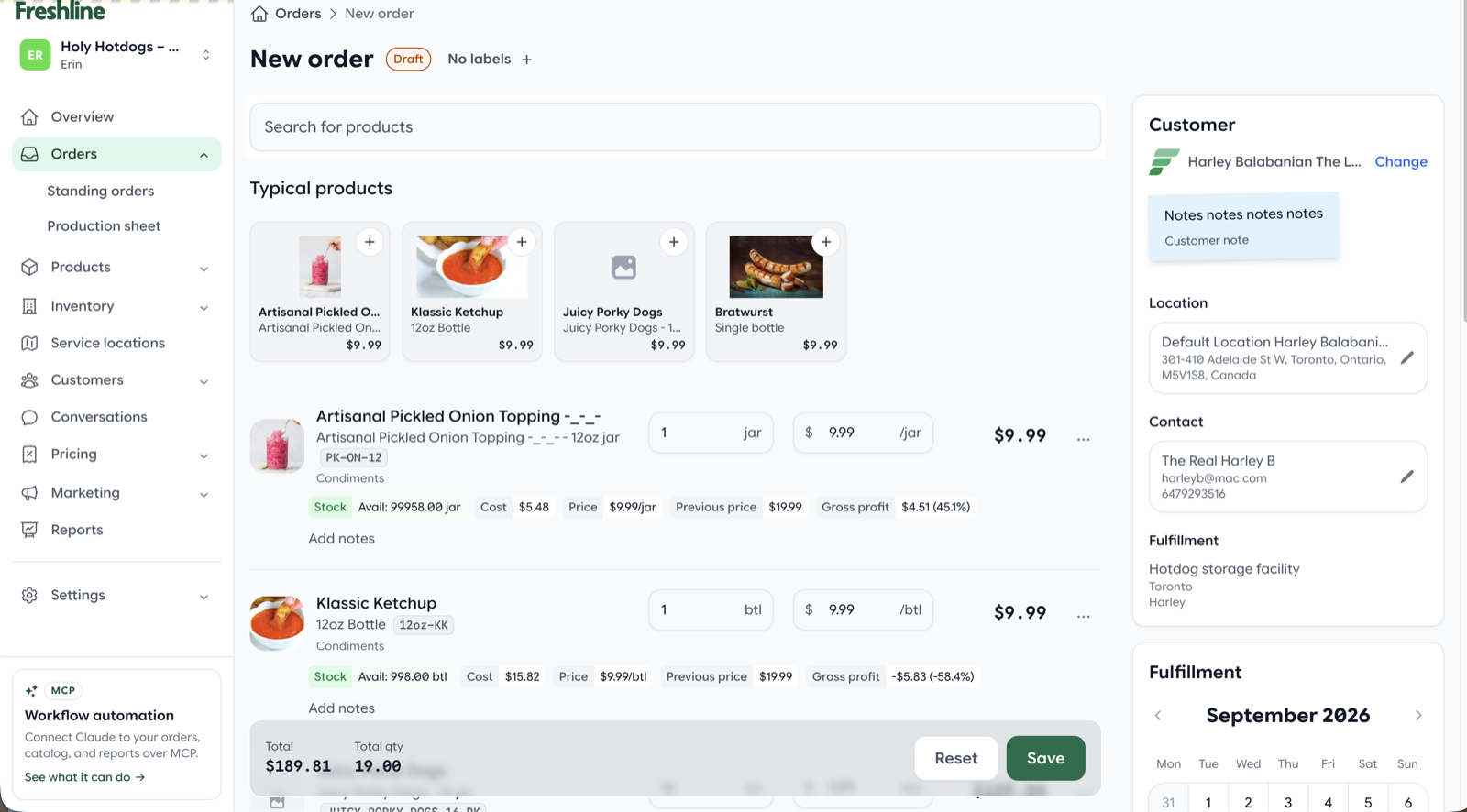
Newest line items appear at the top, with sticky product search, live totals, and ship-to details on the order form.
A more useful orders list
The orders list can be filtered by customer and service location. Order date and sales rep are available as columns, and the former Date column is now labeled fulfillment date so the two dates are harder to mix up. Each staff member can show, hide, and reorder those columns for their own workflow.
Customers, contacts, and communications
Quick-add buyer, location, and contact
Staff can quick-add a buyer, location, and contact from the customer list or the order form. That is meant for the common case where an order is coming in and the account is not fully set up yet — you should not have to abandon the order to create the customer elsewhere.
COD, Credit, and Net terms on buyers
Buyers can now be set to COD, Credit, or Net terms. COD and Credit settle on fulfillment, so the payment expectation is tied to when the order actually goes out rather than when it was first entered.
Office phone, sales CC, and SMS consent
Contacts can have an optional office phone alongside mobile. SMS still uses the mobile number, so text outreach does not accidentally hit a front-desk line. Assigned sales staff are CC'd on customer order and invoice emails, keeping the rep in the thread without a separate forward.
For A2P 10DLC compliance, Freshline now includes public SMS consent and about pages, consent evidence, a verbal script, and STOP/HELP handling — so stores collecting SMS opt-in have the customer-facing and audit pieces in one place.
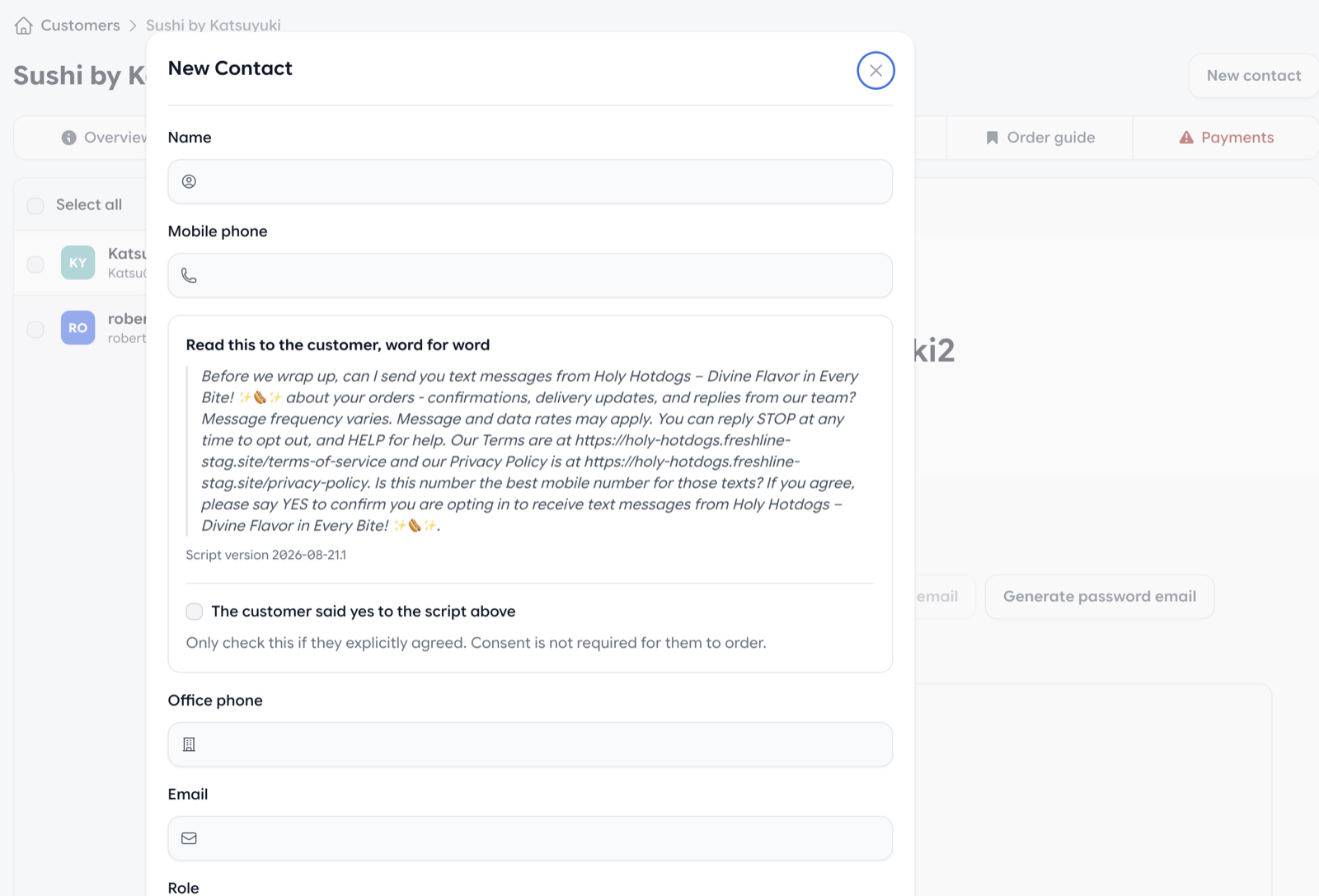
Add a contact with mobile and office phone, plus the verbal SMS consent script and evidence checkbox.
Price lists and storefront
Customer-safe price list PDFs
Price lists can be exported as customer-safe PDFs in a grid or list layout, with photos and storefront prices. Layouts support one to four columns so a catalog can fit on a short handout instead of a long printout. From the customer page, staff can generate buyer-specific price sheets and choose display options for that account.
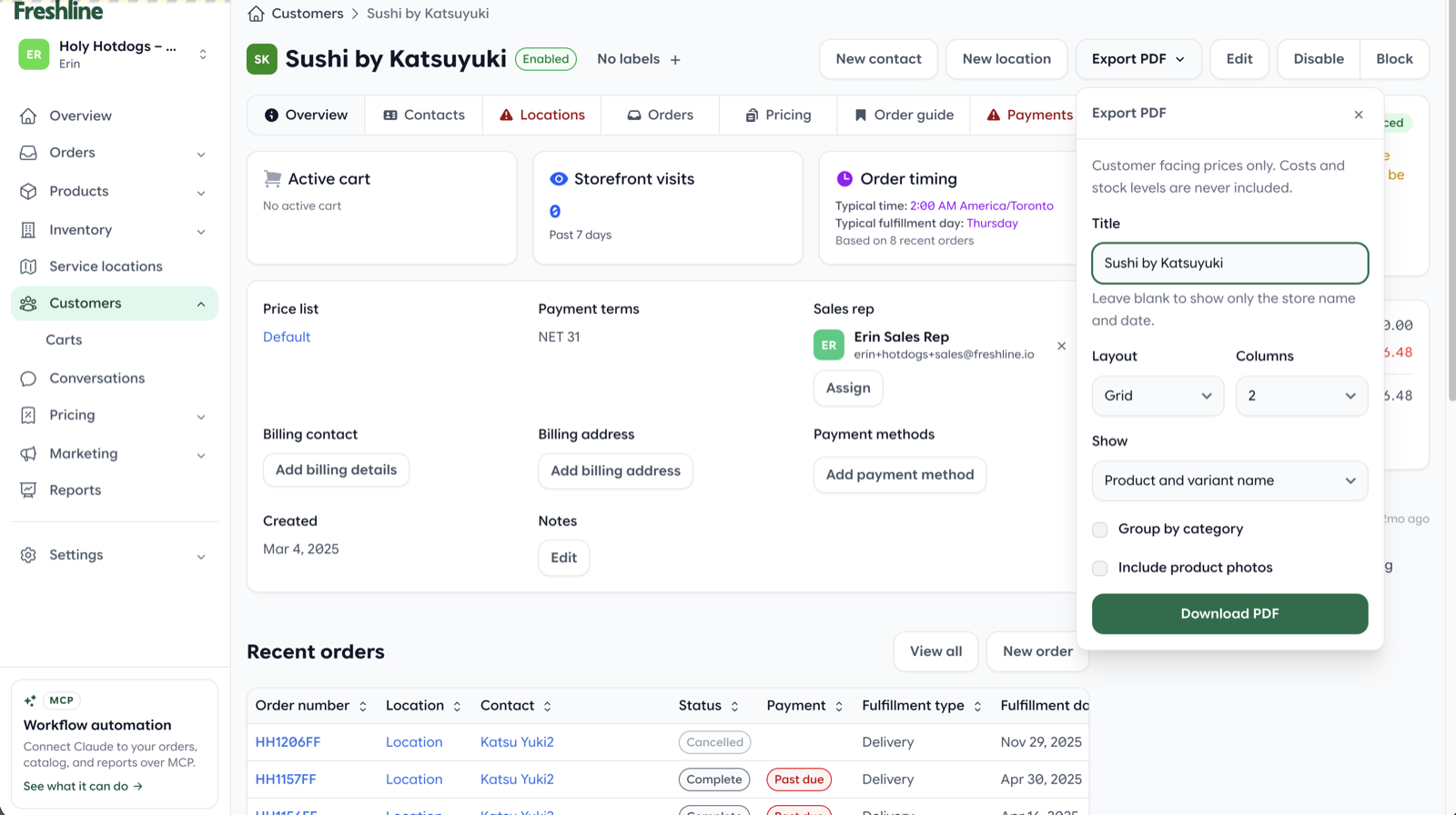
Export a buyer-specific, customer-safe price list PDF from the customer page — grid or list, with optional photos.
Price list activity and public policies
Each price list now has an activity timeline showing who changed what, which makes it much easier to audit a price that suddenly looks wrong. Public terms and privacy pages are also live, with copy polished after review.
Order guide
Favourites and Promotions have been renamed to Order guide — closer to how buyers actually use that list when they reorder.
Vietnamese language
Storefront and admin are now available in Vietnamese, covering the full product experience rather than a storefront-only translation.
Thank you
As always, thank you for the feedback and feature requests that continue to shape the Freshline platform. Many of August's improvements — especially invoice refunds, live order totals, and customer-safe price lists — came directly from operator workflows we see every day.
If you would like a walkthrough of refunds, admin order taking, or any other new capability, reply to your Freshline email or reach out to your Customer Success Manager.